Want to become a web developer and start earning online? Whether you’re aiming for a remote job, freelancing, or building your own product, this complete web development roadmap will guide you through every step — from beginner to pro.
✅ What is Web Development?
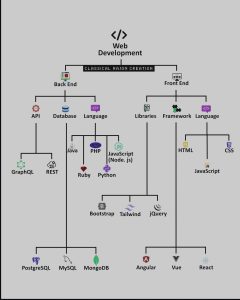
Web development is the process of building websites or web applications that users can access via the internet. It consists of two main areas:
Frontend Development (Client-Side) – Everything users see and interact with on a website.
Backend Development (Server-Side) – Handles logic, database, user authentication, and more.
🧠 Step 1: Learn Frontend Development
Start with frontend. This is the visual part of the website — buttons, text, layouts, images, etc.
🔤 1. Core Languages (Frontend Web Development)
HTML (HyperText Markup Language) – The structure of web pages.
CSS (Cascading Style Sheets) – Styles, layout, and design.
JavaScript – Adds interactivity and dynamic behavior to websites.
🧰 2. Essential Libraries and Tools
Bootstrap – Pre-designed components and responsive layout system.
Tailwind CSS – A utility-first CSS framework for faster styling.
jQuery – A JavaScript library (now optional due to modern JS).
🧱 3. Popular Frontend Frameworks (Choose One)
React.js – Most popular frontend framework; great for job opportunities.
Vue.js – Beginner-friendly, lightweight, and flexible.
Angular – Full-featured, enterprise-level framework.
🔧 Step 2: Learn Backend Development
Backend handles how the website works behind the scenes — logic, storage, and data flow.
🧪 1. Backend Programming Languages (Pick One)
Node.js (JavaScript) – Full-stack development with one language.
Python – Clean syntax, popular for beginners and startups.
PHP – Still widely used in WordPress and web hosting.
Java – Stable, used in large-scale applications.
Ruby (on Rails) – Known for fast development and simplicity.
🔌 2. Understand APIs (Application Programming Interfaces)
APIs let frontend and backend communicate.
REST API – Common standard for connecting apps.
GraphQL – Modern, flexible alternative (used by Facebook, Shopify, etc.)
🗄️ 3. Databases (Backend Essentials)
SQL Databases:
MySQL – Widely used, especially with PHP.
PostgreSQL – Open-source, feature-rich.
NoSQL Databases:
MongoDB – Flexible document-based database, ideal for fast-moving projects.
🧱 Step 3: Build Real-World Full-Stack Projects
Combine your frontend and backend knowledge into actual projects.
Project Ideas:
Personal Portfolio Website
Blogging Platform
E-commerce Store
Social Media Clone
🛠️ Use Git and GitHub for version control and code collaboration.
💼 Step 4: Start Earning as a Web Developer
Once you have a few projects in your portfolio, it’s time to start making money with your skills.
👨💻 Freelancing (Work for Clients)
Top Platforms:
Fiverr
Upwork
Freelancer
Toptal
Tips:
Create a professional portfolio website.
Offer niche services like landing page design, API integration, bug fixing.
Build sample projects for real-world experience.
🌍 Remote Jobs and Internships
Best Websites for Remote Jobs:
LinkedIn Jobs
AngelList
RemoteOK
We Work Remotely
Skills Required:
Git/GitHub
Responsive Web Design
Working with APIs
Basic problem-solving (practice on LeetCode or HackerRank)
💰 Create Passive Income with Web Development
Sell website templates on ThemeForest or Gumroad
Build and launch your own SaaS product
Start a tech blog or YouTube channel
📈 Step 5: Advance and Specialize
Once you’re comfortable with web development fundamentals, level up with advanced topics.
Recommended Topics:
TypeScript – A typed version of JavaScript for scalable apps.
Next.js or Nuxt.js – Server-side rendering and SEO-friendly frameworks.
DevOps Basics – Learn Docker, CI/CD pipelines.
Security Best Practices – Protect user data and prevent attacks (XSS, SQLi, etc.).
🔚 Final Thoughts
Web development is one of the most in-demand skills in the digital economy. Whether you want to freelance, get a remote job, or launch your own product — the possibilities are endless.
Learn. Build. Share. Earn. Repeat. 🚀